Shopify International Shipping
Selling internationally on Shopify comes down to three things: getting shipping rates right, calculating duties and taxes per destination, and showing the full landed cost at checkout. Get those right and customers pay no surprise fees on delivery — which is where most international orders get abandoned.
What Decides International Sales
A cross-border order succeeds or fails on four things, and most merchants get the first one right while ignoring the rest.
Shipping rates
Give customers a clear, realistic delivery cost for their country before they commit — not a flat worldwide rate that loses money on distant orders.
Duties and taxes
Import duty and VAT or GST are charged by the destination country and vary by HS code and origin. Estimate them with our free duty and tax calculator.
Landed cost at checkout
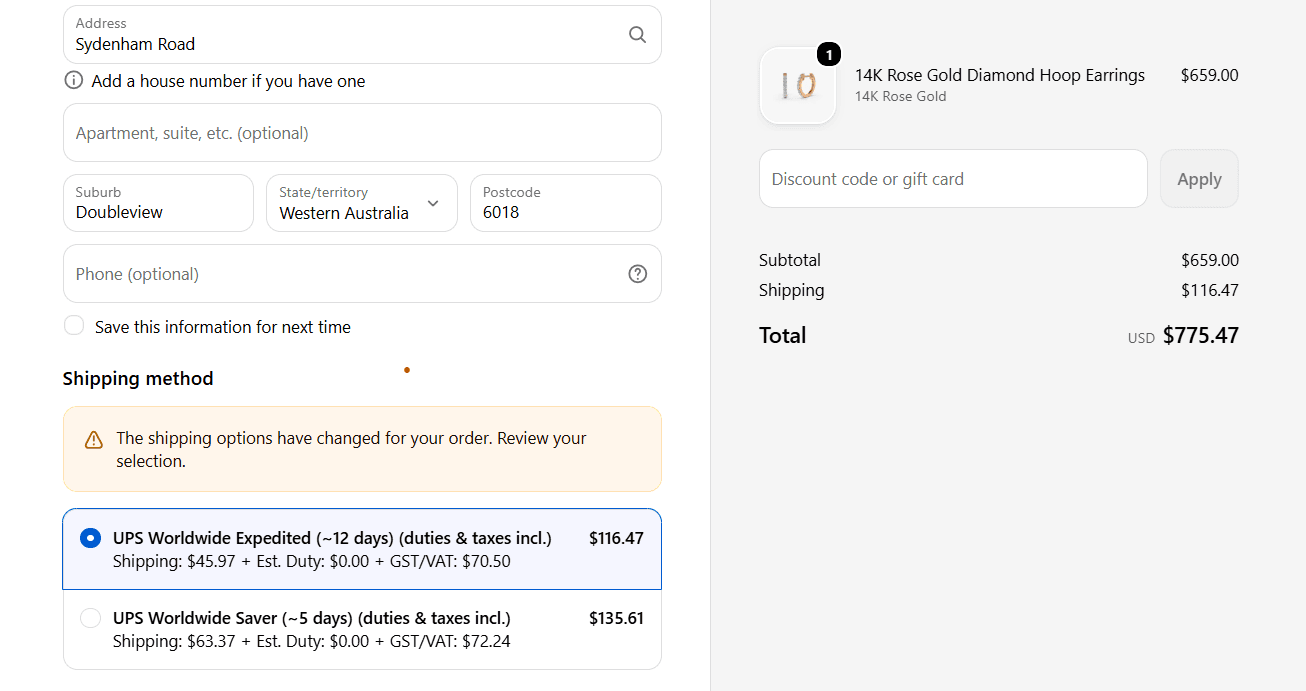
Show one final price — product, shipping, duty, and tax — so customers pay no surprise courier bill. This is the core idea behind DDP shipping.
AI HS classification
RateTell classifies each product with AI so the duty and tax math is based on the right HS code.
Shopify Markets vs Selling Internationally Manually
Shopify Markets
- Built-in way to sell internationally from one store
- Localizes currency, language, pricing, and domains per market
- Controls which countries you sell to, from the admin
- Calculates and collects estimated duties and import taxes at checkout — natively on Advanced/Plus plans, or end-to-end via Managed Markets
Selling Manually
- Separate shipping profiles, currencies, and price lists
- Workable for two or three countries
- Every new market multiplies the settings you keep in sync
- Breaks down as you add more markets
Ready to configure it? Follow our guide to setting up international shipping on Shopify.
Duties and Taxes: DDP vs DAP
Under DDP (Delivered Duty Paid), you charge the customer duty and tax at checkout and clear customs yourself, so nothing is owed on delivery. Under DAP (Delivered At Place), the buyer pays duties and taxes to the carrier before the parcel is released.
DDP converts better because the customer sees one final price. DAP keeps your listed price lower, but it produces the surprise courier invoices that drive refused deliveries and refund requests. The tradeoff matters most in the US, where the $800 de minimis exemption has been suspended since August 2025, and in the EU, where a flat €3 duty now applies to parcels up to €150.
Read the full DDP shipping explained breakdown, or compare the tools that automate both in the best apps for international shipping.
Estimate Landed Cost Before You Sell
Landed cost is the full price of getting an order to the customer's door: product plus freight, insurance, duty, and import VAT or GST. Set your international prices from the landed cost, not the sticker price, or you will sell at a loss on cross-border orders — a $60 product can carry $20 or more in duty and tax.
Use our Shopify landed cost calculator to price a whole catalog, or the free duty and tax calculator for a single product look-up.
See what your customers would pay
Enter a product's HS code, value, and destination to see the exact duties and taxes your customers would face at the door.
Import duty & tax calculator.
Estimate import duty, VAT/GST, sales tax, and landed cost for one or many HS codes — including US import duty. Enter a 6-digit HS code for a quick lookup, or a full 10-digit HTS code for a detailed landed cost calculation.
Frequently Asked Questions
How do I ship internationally on Shopify?
Turn on Shopify Markets, set up a shipping zone and rate for each country you sell to, then decide who pays duties — you under DDP or the customer under DAP. Shopify covers the storefront and label side; duties and taxes are calculated separately, so most merchants add a landed-cost app or calculator before launch. Our step-by-step guide walks through the full setup.
Does Shopify calculate customs duties and taxes?
Yes. Shopify Markets can calculate and collect estimated duties and import taxes at checkout based on each product's HS code, country of origin, and the customer's location. It's available natively on Shopify Advanced and Plus plans, while lower plans typically need a third-party app; Shopify's Managed Markets service (a paid merchant-of-record add-on) calculates, guarantees, and remits them end to end. The amount depends on each product's HS code, the destination country, and the country of origin — and because the US suspended its $800 de minimis exemption in August 2025, nearly every US-bound order now needs a real calculation.
What is Shopify Markets?
Shopify Markets is Shopify's built-in feature for selling internationally from one store. It localizes currency, language, pricing, and domains per market and controls which countries you sell to. It handles the storefront experience, but you still configure shipping rates and landed cost separately.
Should I use DDP or DAP for international shipping?
Use DDP when you want customers to see the full landed cost at checkout and pay nothing on delivery — it removes surprise courier bills and cuts cart abandonment. Use DAP when you want to keep your listed price lower but pass duties and taxes to the buyer, who pays the carrier before release. Most direct-to-consumer Shopify stores convert better with DDP.
How do I estimate landed cost for a Shopify order?
Landed cost is the product price plus freight, insurance, duty, and import VAT or GST. Estimate it per product using its HS code and destination country, then add tax on top of goods plus shipping plus duty. A landed-cost calculator does the math in seconds for any product and country.
Show the Full Cost at Checkout
Give international shoppers the final price — duties and taxes included — before they pay.
Learn more: Landed Cost · DDP Shipping · Duty & Tax Calculator